Free Purchase Order Template and PO Generator
Create a purchase order online, calculate totals automatically, preview the finished document, and print or save as PDF without downloading a spreadsheet first.
Build a purchase order in your browser
Enter buyer, vendor, shipping, line-item, tax, and approval details. The preview updates live, calculates totals for you, and prints cleanly as a purchase order document.
No data leaves your browser. The draft is stored locally on your device when browser storage is available.
What Is a Purchase Order?
A purchase order is a buyer-issued document that tells a supplier what goods or services to provide, at what price, under which delivery and payment terms.
For ecommerce and operations teams, the PO becomes the shared reference before stock moves. It gives the supplier authority to prepare the order, gives the receiving team a record to check against incoming cartons, and gives finance a number to match against the supplier invoice later. A clear PO also reduces back-and-forth when prices, packaging, delivery dates, or substitutions need approval before shipment.
- Procurement or operations teams use it when ordering inventory, packaging, supplies, freight, or services.
- Suppliers use it to confirm SKUs, quantities, delivery expectations, payment terms, and billing references.
- Warehouses and finance teams use it when goods arrive, invoices are reviewed, and exceptions need a common paper trail.
Purchase Order vs Invoice vs Goods Receipt
A PO, invoice, and goods receipt are linked, but each answers a different question. The PO records what the buyer approved, the invoice requests payment, and the goods receipt records what arrived.
| Document | Who sends it | When | Purpose |
|---|---|---|---|
| Purchase order | Buyer | Before supply | Approves items, prices, quantities, terms, and delivery. |
| Invoice | Supplier | After shipment or service | Requests payment against the PO reference. |
| Goods receipt | Warehouse | At delivery | Records accepted, short, damaged, or rejected goods. |
How the PO, invoice and goods receipt are matched
In a three-way match, finance checks the PO, invoice, and receiving record together. If the PO approved 20 cases at a set price, the warehouse should receive 20 cases and the invoice should charge that amount. When quantities, prices, tax, freight, or delivery terms differ, the PO number gives each team one reference for resolving the exception.
Purchase Order Fields Buyers and Suppliers Expect
A useful purchase order is more than a total. It needs enough commercial detail for the supplier to fulfill the order, the warehouse to receive it, and finance to match it against invoices later.
Order details
PO number, PO date, requested delivery date, payment terms, shipping method, and delivery terms help both sides identify and schedule the order.
Buyer, vendor, and ship-to blocks
Separate buyer, bill-to, vendor, and ship-to information reduces confusion when finance and warehouse teams use different addresses.
Line items and totals
SKU or item number, description, quantity, unit, unit price, amount, subtotal, tax, shipping, handling, discount, and total make the PO easier to match to invoices and receipts.
What a Completed Purchase Order Looks Like
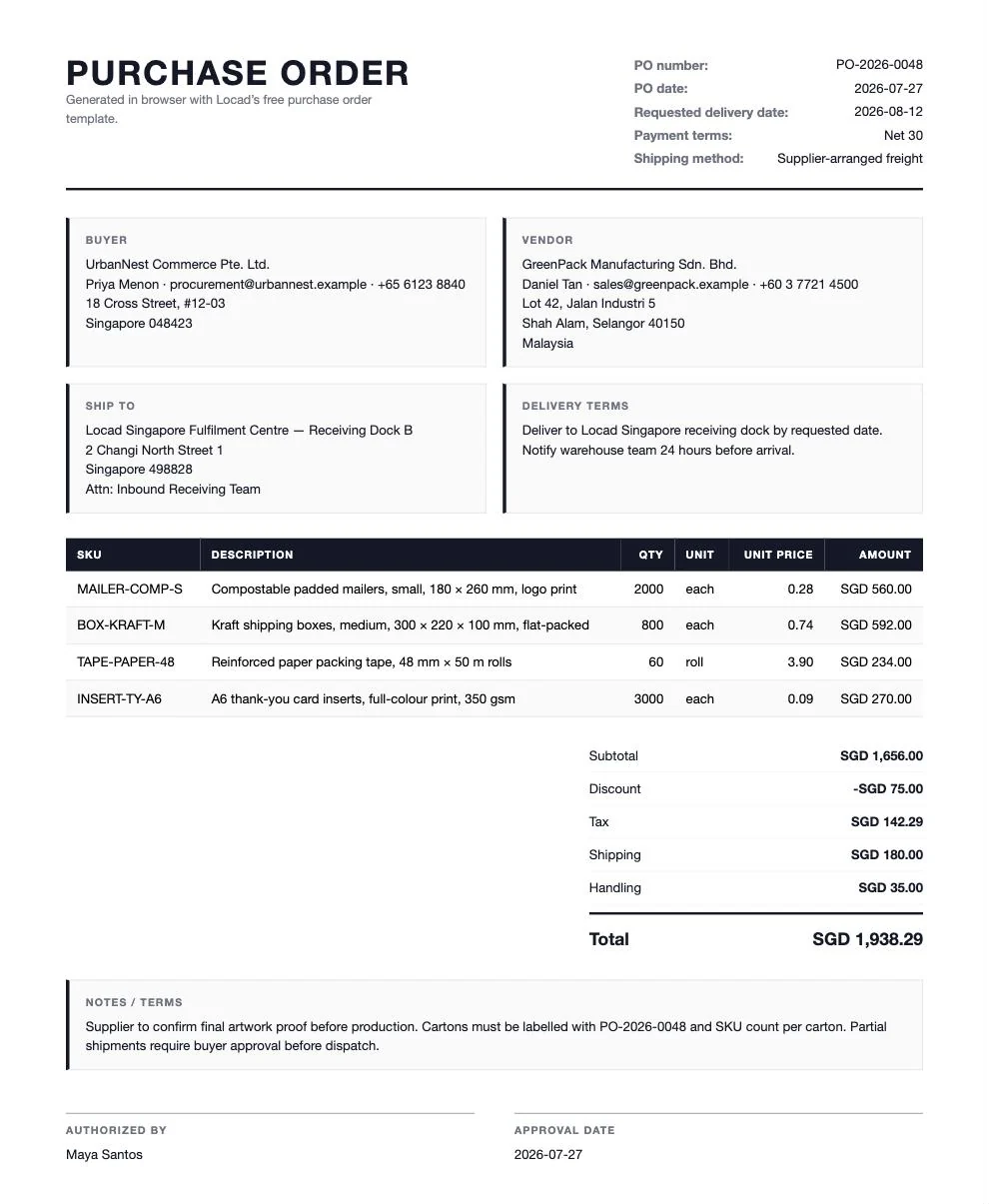
This completed purchase order example was produced with the generator on this page and saved as a PDF. It shows the full document flow in one printable layout: header and PO number at the top, buyer and vendor blocks, ship-to address, delivery terms, line items, charges, totals, notes, and approval fields.
The sample uses the same values loaded in the tool, so you can compare the editable form against the finished output before replacing the details with your own supplier order. It is also a useful check for spacing: long addresses, item descriptions, tax, shipping, and handling charges all need to remain readable on the PDF you send to a vendor.
Types of Purchase Orders
This generator is built for a standard purchase order: a clear one-time order with specific buyer, supplier, item, quantity, price, delivery, and payment details. Other PO types use many of the same fields, but they usually need extra controls from procurement or finance before they are sent.
Standard Purchase Order
A standard PO is used when the buyer knows exactly what is being purchased, how many units are needed, the expected price, and where the order should be delivered. It is the right fit for most ecommerce replenishment, packaging, and service orders.
Planned Purchase Order
A planned PO documents an expected future purchase, but release timing or exact delivery schedules may still change. Operations teams may use it when demand is forecasted but supplier release dates need later confirmation.
Blanket Purchase Order
A blanket PO covers repeated purchases from the same supplier over a period, often with agreed pricing or limits. The fields look familiar, but controls around spend caps, release orders, and validity dates matter more.
Contract Purchase Order
A contract PO is tied to broader commercial terms rather than a single item shipment. Use finance or procurement approval before adapting a simple PO format for contract-backed purchases.
Service Purchase Order
A service PO covers work such as repairs, consulting, warehouse services, freight, or installation. Instead of SKU quantities alone, the description should make scope, milestones, rates, taxes, and acceptance requirements clear.
How to Number Purchase Orders
Use purchase order numbers that are unique, sequential, and easy to read in email subject lines, invoices, packing slips, and receiving records. A common convention is a prefix plus year plus sequence, such as PO-2026-00048. The prefix identifies the document type, the year helps filing, and the sequence prevents duplicates.
Do not reuse a cancelled PO number for a new order. Cancelled, revised, and closed POs should remain traceable so finance can explain why an invoice was rejected or a shipment was not received. If your business uses multiple entities or warehouses, add a controlled prefix only if the team can apply it consistently. Keep the number visible wherever the supplier, warehouse, and finance team need to connect the same order.
From Template to Supplier-Ready PO
Fill the form
Replace the example buyer, supplier, delivery, item, tax, and approval details with your own order information.
Review the preview
The printable PO updates live, with line amounts rounded first and then summed into the subtotal so visible rows add up.
Print or save as PDF
The preview is the printed page, so what you see is what you get. Print it, or choose “Save as PDF” in the print dialog to send it to your supplier.
Editable Purchase Order Template, Without Spreadsheet Formatting
Search results for purchase order templates often mix spreadsheet files, Word documents, and PDF samples. This page takes a different route: it gives you an editable browser form and a printable PO preview, but it does not offer a separate file download.
| If you searched for | Use this page how |
|---|---|
| Editable purchase order template | Edit the buyer, supplier, line items, tax, shipping, notes, and approval fields directly in the browser. |
| Purchase order template in Word | Use the structured fields here when you want a clean printable layout without manually aligning Word tables. |
| Purchase order template in Excel | Use the built-in calculations when you want totals without maintaining spreadsheet formulas or page breaks. |
| Purchase order PDF template | Complete the PO online, then print or save the finished document as a PDF from your browser. |
Everything runs client-side. Locad does not upload your entered PO data, and the output is the printable document you create from the browser print dialog.
How to Send a Purchase Order to a Supplier
- Check the PO number, buyer entity, supplier name, billing details, ship-to address, and requested delivery date before sending. Make sure the order is approved under your company policy.
- Review every line item for SKU, description, quantity, unit, unit price, tax, shipping, handling, discount, and total amount. Confirm that any substitutions or backorders are noted clearly.
- Save the finished purchase order as a PDF so the supplier sees the same layout you approved. Keep the file name tied to the PO number.
- Email the PDF to the supplier contact and include the PO number in the subject line and message body. Copy internal receiving or finance contacts if they need the record.
- Ask the supplier to confirm availability, pricing, delivery date, substitutions, and any charges that differ from the PO before they ship. Store the confirmation with the PO for invoice matching.
Plan Purchasing, Storage, Fulfillment, and Shipping Together
Purchase orders are part of a larger inventory and fulfillment workflow. Use these Locad resources to connect procurement planning with warehousing, fulfillment costs, carton sizing, and outbound shipping.
Purchase Order Template Questions
Need Fulfillment Support After the PO?
Locad helps brands connect inventory, warehousing, fulfillment, and shipping so purchase planning turns into faster customer delivery.